Projectal Release Notes: Version 6.5 Changelog


Projectal 6.5 expands the platform's core planning and tracking capabilities with the introduction of full timelogging, enhanced scheduling tools, and improved reporting across projects and staff. Studios can now track actual work in detail, sync timelogs from production tools, and compare real effort against bids and schedules.
This release also improves many of the daily workflows teams rely on. Scheduling can now be done at minute-level precision, reporting includes new rolling date presets, and staff planning tools are faster to navigate. With expanded integrations, new APIs, improved automation, and over 100 fixes, Projectal 6.5 continues to strengthen the platform for production teams managing complex projects.
New
Timelogs
Projectal now includes full timelogging features that let you record and report when staff complete work on projects, tasks and activities. Connect Projectal to your shot tracking tools such as Flow/ShotGrid, ftrack and Kitsu to automatically sync timelogs.
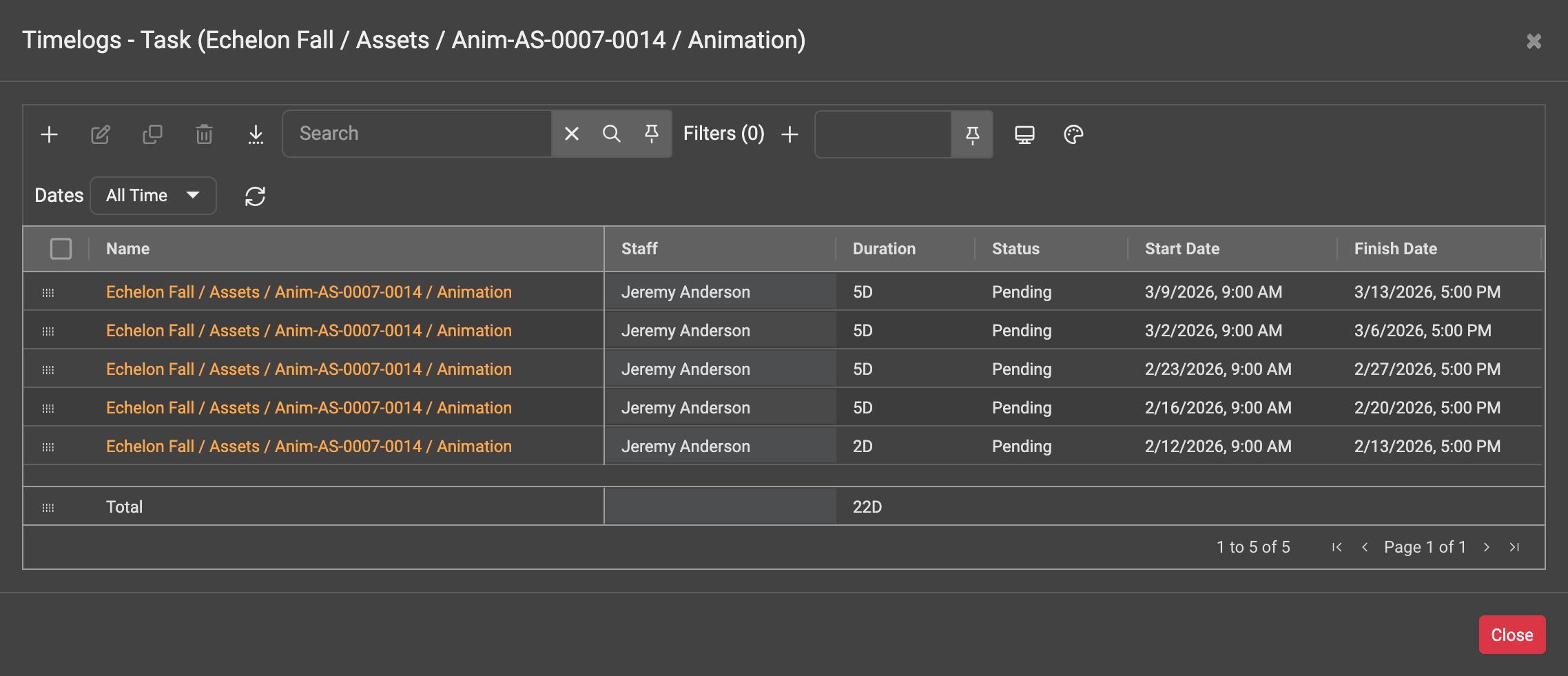
You can view detailed actual cost breakdowns by day, week, month or year across staff, departments, locations and projects. Create reports for any date range, compare actuals with bids and estimates to understand budget and scheduling performance, and export timelog and actuals data to spreadsheets and finance tools.
Scheduling and Tracking Tasks Using Per Day Schedules
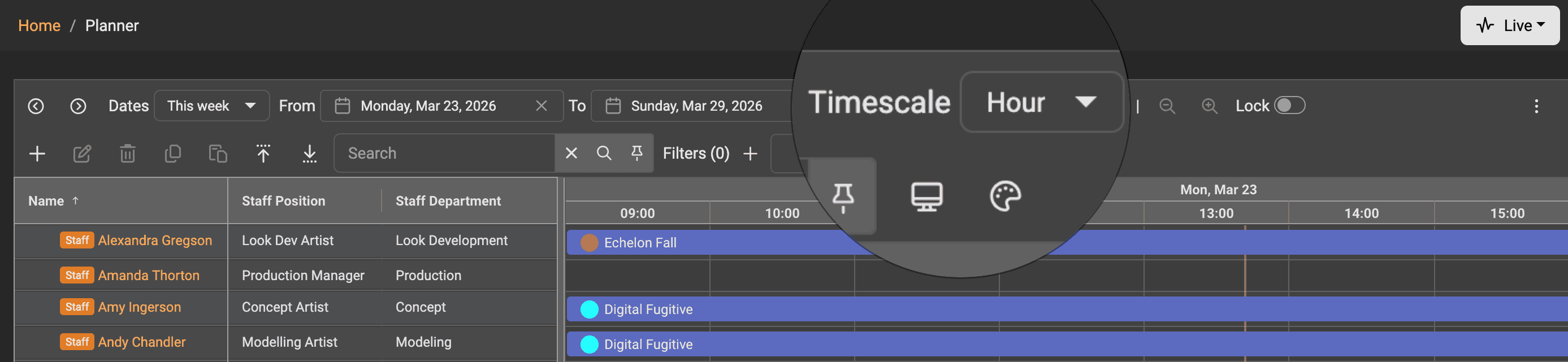
For studios that need to book and allocate staff on a per day calendar, Projectal now includes a Hour timescale in Staff Planner, so you can easily book or allocate staff using minute-by-minute timespans. For example, schedule a task or booking for 15 minutes, 30 minutes, or 2 hours, or the whole day. This is perfect for companies that schedule staff for short tasks within projects. Get dynamic usage metrics to fully understand costs, over allocations, availability and more.
Faster Calendar Navigation
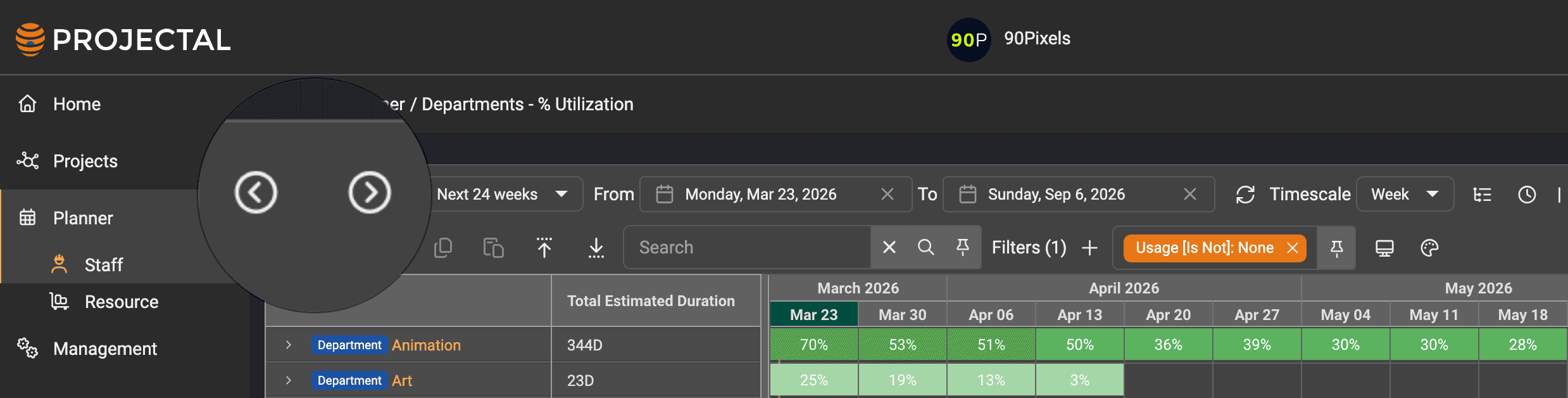
The Staff Planner and Resource Planner have new toolbar buttons that allow you to quickly navigate to the previous or next timescale. For example, when in Day timescale, click the Previous or Next toolbar button to skip quickly to the previous or next day.
More Dynamic Date Range Presets
New date range presets have been added to the Staff Planner, Resource Planner, Projects and Gantt screens to allow you to have more dynamic date range presets, including Last 4 Weeks, Last 8 Weeks, Last 12 Weeks, Last 24 Weeks, Last 52 Weeks and many more. This allows you have rolling, dynamic reports that you can add to your dashboards and export to spreadsheets.
Auto Splitting Bookings, Activities and Tasks
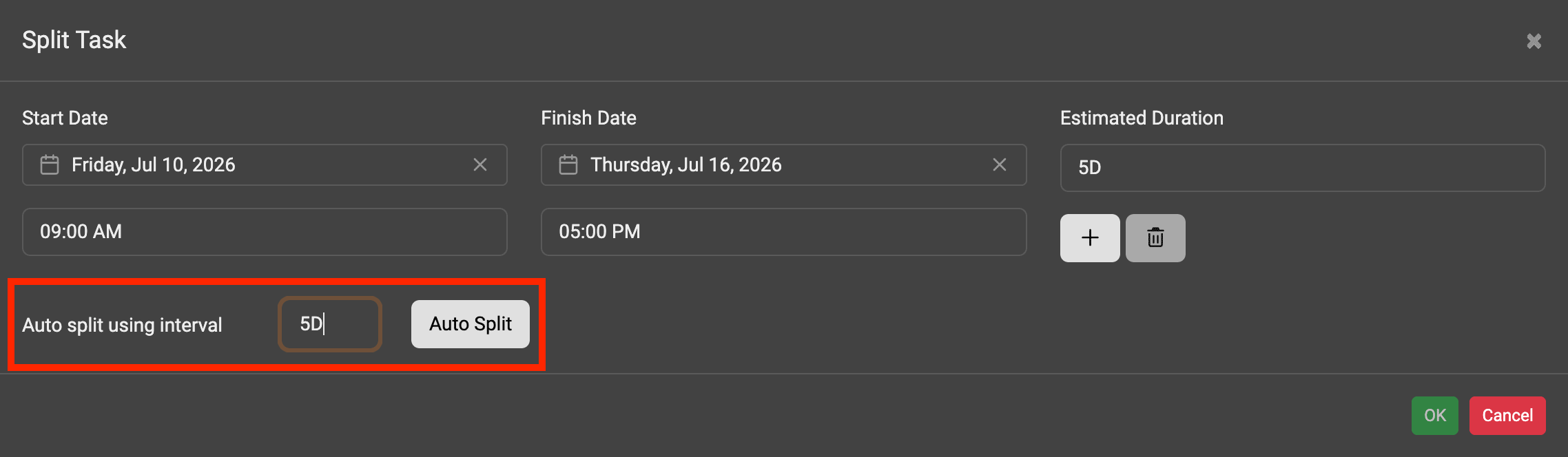
New auto splitting features let you quickly split bookings, tasks and actitivies using your preferred timespan. For example, auto split a booking in 2 day intervals, or 30 minute intervals or 1.5 week intervals.
Currently Assigned Staff
If you assign multiple staff to the same task, it is useful to know who is currently working on it. Projectal now lets you mark staff as currently assigned on tasks and activities, so you can easily see who is actively responsible for the work.
Permissions - Timelogs
With the new timelog features, there are matching permissions to allow you to control who can view, add, edit and delete timelogs in Projectal.
User Auditing
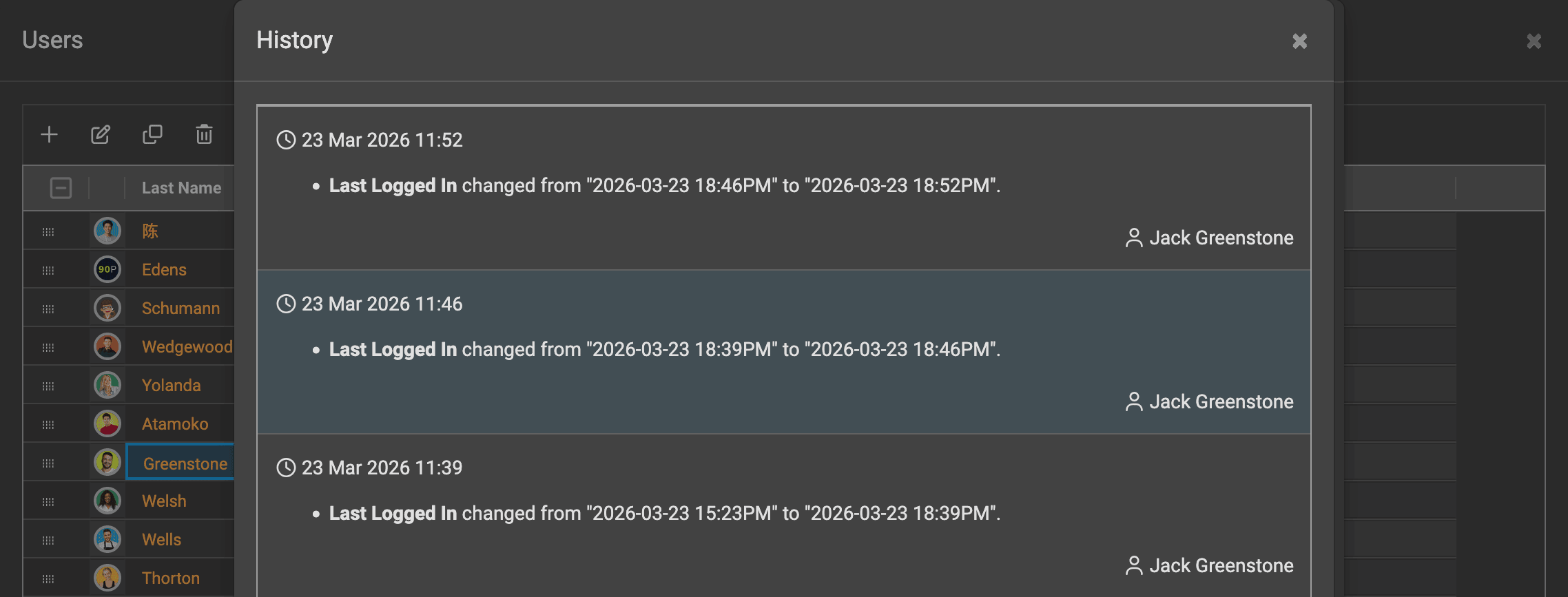
Projectal includes full user auditing features that lets you see a full history when users last logged into Projectal. Go to the Users screen and edit a user to see their last logged in time and full history.
Lists - Timesheet Status
With the new timelog features, there is a set of customizable timelog status strings (such as Pending, Submitted, Approved) in the Lists screen that let you configure the way that your company wants its staff to enter and approve timelogs.
New API Functions and Webhooks
For developers, new APIs have been added to get, add, update and delete timelogs. Also, new webhooks have been added to subscribe when changes occur to timelogs and lists.
Improved
Auto Assign Staff
Projectal includes AI-powered staff recommendations that analyze your staff pool and suggest the best people for tasks within your projects. In Projectal 6.5, this feature has been improved to consider more data points, provide greater flexibility, and run more efficiently.
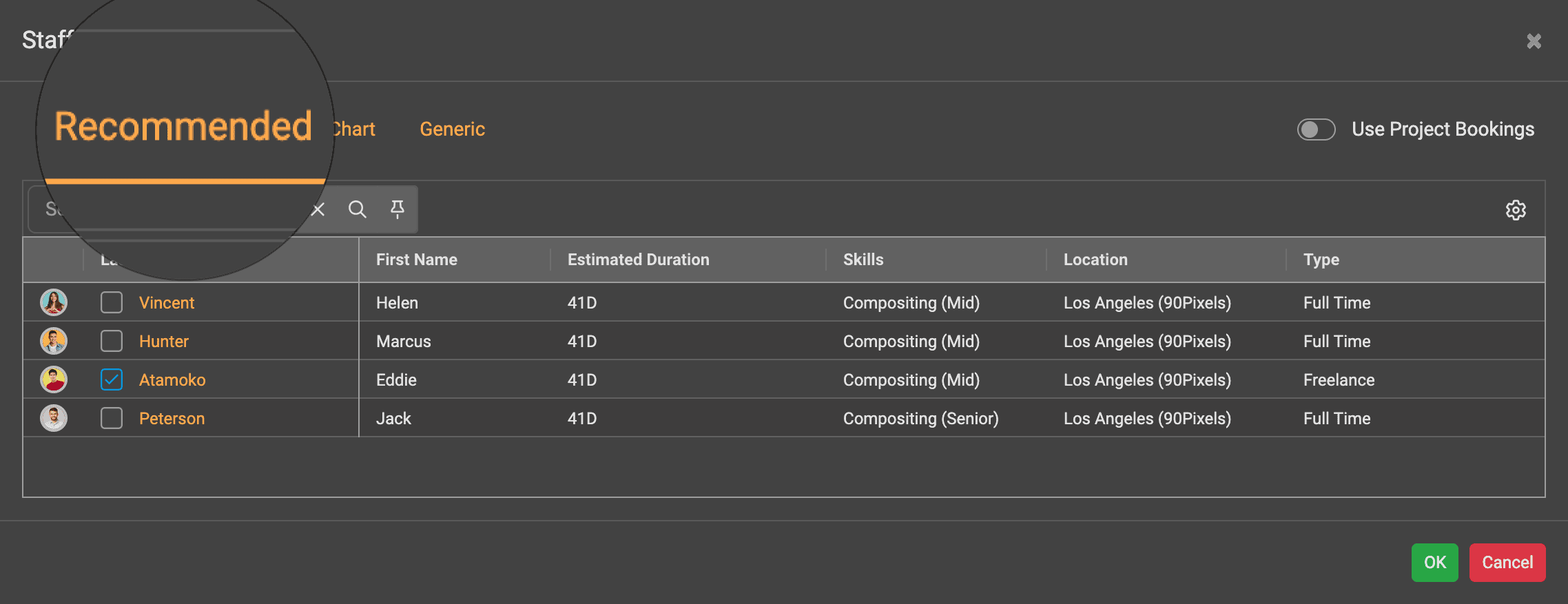
The system evaluates a wide range of factors, including staff skills, availability, employment status, start and end dates, holidays, location, existing project bookings, and more. This helps you quickly identify the most suitable staff for each task while helping avoid over-allocation or underutilized staff.
Importing Data from Spreadsheets
Projectal allow you to import your data from Excel or Google Sheets spreadsheets for all entities within Projectal, including projects, tasks, staff, departments, locations, bids, schedules and more. Projectal 6.5 contains improvements to importing so that more data points can be imported and existing items of data can be updated within Projectal.
Partial Non-Work Exceptions & Overlapping Non-Work Exceptions
For optimal scheduling of your staff, you can add all of their holidays and time off as non-work exceptions into Projectal. Projectal 6.5 now takes this a step further with allowing partial time off work and overlapping non-work exceptions. For example, you can now record that a staff member will take 2 hours off work from 9AM next Wednesday for a medical appointment. You can add non-work directly into Projectal, or sync this staff data automatically from your HR software.
Continue Editing After Saving
In Staff Planner, when you add a booking, task, activity or non-work exception, you can now click the new "Continue editing after saving" checkbox to allow you to quickly edit all settings for the event that you are adding.
More Color Coding Options
In Staff Planner, you can now color scheduled events in more ways using the Color By toolbar button. This gives your team a better and more visual understanding of your resourcing schedules. For example, view bookings by their project color, non-work exceptions by status color, and activities by their activity color.
Using Custom Fields
Extend Projectal with your own custom fields so that you can store company specific data points for your staff, projects, tasks, departments and more. Projectal 6.5 lets you do more with custom fields, including adding these custom field data points into your data view reports, searching and filtering by custom fields, sorting data by custom fields, and exporting custom field data points in your reports.
Better Scenario Planning & Sandboxes
Projectal's extensive scenario planning, sandboxing and publishing features have been further improved so that all changes within a user's sandbox can be better previewed prior to publishing into your live Projectal system.
Improved History & Time Machine
View the full history of all changes and who made these changes in your Projectal, including changes to projects, tasks, bookings, staff, departments and more. Projectal 6.5 extends the history reporting so that you can learn more over time. Use Time Machine features in Projectal to wind back to any previous date to see the state of your company, departments, projects, staff, locations, budgets, schedules and more.
Python Library
For developers, the Projectal Python library has been updated to include the new features contained in Projectal 6.5. The Python library lets you create applications to work alongside Projectal and seamlessly sync data to and from Projectal.
Connectors
All connectors have been improved to take advantage of the new features and data points in Projectal 6.5. Our growing library of connectors includes support for popular tools such as Flow/ShotGrid, Workday, BambooHR, ftrack, HiBob, Google Calendar, Monday, PeopleHR, Quick Books, SharePoint, Kitsu and many more.
Online Documentation Updated
Read about all the latest features and improvements in our online documentation and helpdesk.
Fixed
Over 100 issues reported by customers and from our testing have been fixed.